Error Handling Workflow Checklist to Catch Bugs Faster and Reduce Production Failures
Modern systems fail in subtle ways, from transient cloud timeouts to race conditions triggered by auto-scaling and teams that rely on ad hoc fixes often ship bugs straight to production. Effective error handling workflows turn failures into signals by standardizing how exceptions are detected, classified, logged and recovered across services. As microservices, server-less runtimes and event-driven architectures dominate in 2025, practices like structured error taxonomies, OpenTelemetry-based tracing and policy-driven retries have become essential. High-performing teams now pair these workflows with AI-assisted observability and chaos testing to expose edge cases before users do. By treating errors as first-class design inputs rather than afterthoughts, engineers reduce mean time to recovery, prevent silent data corruption and build systems that fail predictably under real-world load.
Understanding Error Handling Workflows and Why They Matter
Error handling workflows refer to the structured processes teams use to detect, log, respond to and resolve errors across the software development lifecycle. These workflows are not just about catching bugs – they are about ensuring reliability, protecting user experience and reducing costly production failures.
According to Google’s Site Reliability Engineering (SRE) principles, effective error handling is a core component of system resilience. Without a defined workflow, teams often rely on ad-hoc debugging, which leads to slower incident response and recurring issues.
In real-world terms, I’ve seen early-stage startups ship features quickly but suffer frequent outages because error handling was treated as an afterthought. Once structured error handling workflows were introduced – centralized logging, alerts and clear ownership – the same teams reduced production incidents by more than 40% within a quarter.
Key Components of a Reliable Error Handling Workflow
An effective workflow is made up of interconnected components that work together to surface, diagnose and resolve issues efficiently.
- Error Detection
- Identifying exceptions, crashes, failed API calls and unexpected behavior.
- Error Classification
- Distinguishing between critical, non-critical, transient and user-facing errors.
- Logging and Monitoring
- Capturing error details in a centralized system.
- Alerting and Notifications
- Notifying the right people at the right time.
- Resolution and Recovery
- Fixing the root cause and restoring service.
- Post-Incident Review
- Learning from failures to prevent recurrence.
Defining Clear Error Categories and Severity Levels
Not all errors deserve the same response. One of the most common mistakes I’ve encountered in engineering teams is alert fatigue – everything triggers an alert, so nothing gets attention.
To avoid this, error handling workflows should define severity levels such as:
- Critical
- System outages, data loss, security incidents.
- High
- Core functionality degraded but service still running.
- Medium
- Non-blocking issues affecting a subset of users.
- Low
- Cosmetic bugs or recoverable edge cases.
This approach aligns with guidance from ITIL and incident management frameworks widely adopted in enterprise environments.
Implementing Structured Logging for Faster Debugging
Logs are the backbone of any error handling workflow. Plain text logs are no longer sufficient for modern distributed systems.
Structured logging uses consistent formats (often JSON) to make logs searchable and machine-readable.
 { "timestamp": "2026-01-22T10:15:30Z", "level": "ERROR", "service": "payment-api", "error_code": "PAY-402", "message": "Payment authorization failed", "user_id": "12345"
}
Tools like Elasticsearch, Logstash and Kibana (ELK Stack) or cloud-native solutions such as AWS CloudWatch and Google Cloud Logging are commonly used and The CNCF (Cloud Native Computing Foundation) recommends centralized logging as a best practice for scalable systems.
Monitoring and Alerting Without Overloading Your Team
Monitoring answers the question: “Is something wrong right now?” Alerting answers: “Who needs to act?”
Effective error handling workflows separate signal from noise by:
- Setting thresholds based on real user impact
- Using rate-based alerts instead of single-event triggers
- Routing alerts to on-call engineers or teams
Graceful Degradation and User-Friendly Error Responses
Error handling is not just a backend concern – it directly affects users. Graceful degradation ensures the system continues to function in a limited capacity when something fails.
Instead of generic messages like “Something went wrong,” user-friendly error responses should:
- Explain what happened in simple terms
- Suggest next steps
- Avoid exposing sensitive system details
For example, Amazon’s user experience guidelines emphasize informative error messages as a way to maintain trust even during failures.
Automated Testing as a Preventive Error Handling Strategy
While error handling workflows often focus on production, prevention starts earlier. Automated testing catches bugs before they reach users.
- Unit Tests
- Validate individual functions.
- Integration Tests
- Ensure components work together.
- End-to-End Tests
- Simulate real user behavior.
Modern CI/CD pipelines integrate testing with deployment, aligning with recommendations from experts like Martin Fowler, who advocates continuous testing as a quality gate.
Comparing Manual vs Automated Error Handling Approaches
| Aspect | Manual Error Handling | Automated Error Handling |
|---|---|---|
| Detection Speed | Slow, human-dependent | Near real-time |
| Scalability | Limited | Highly scalable |
| Consistency | Varies by individual | Standardized responses |
| Operational Cost | High over time | Lower with proper setup |
Incident Response Playbooks and Ownership
Even the best error handling workflows fail without clear ownership. Incident response playbooks define:
- Who is responsible for responding
- Steps to diagnose and mitigate issues
- Communication protocols with stakeholders
The U. S. National Institute of Standards and Technology (NIST) highlights documented incident response procedures as a cornerstone of operational security and reliability.
Post-Incident Reviews and Continuous Improvement
Once an incident is resolved, the work is not over. Post-incident reviews (also called blameless retrospectives) focus on learning, not assigning fault.
Key questions to ask:
- What failed in the system?
- Why did existing error handling workflows not catch it earlier?
- What changes will prevent this in the future?
Google’s SRE teams famously credit blameless postmortems as a major reason for their ability to operate large-scale systems reliably.
Real-World Use Cases Across Industries
Error handling workflows are not limited to tech companies.
- Healthcare
- Ensuring patient data systems fail safely and alert staff immediately.
- E-commerce
- Preventing revenue loss during checkout failures.
- Banking
- Detecting transaction anomalies in real time.
In each case, structured workflows directly correlate with reduced downtime, improved compliance and higher user trust.
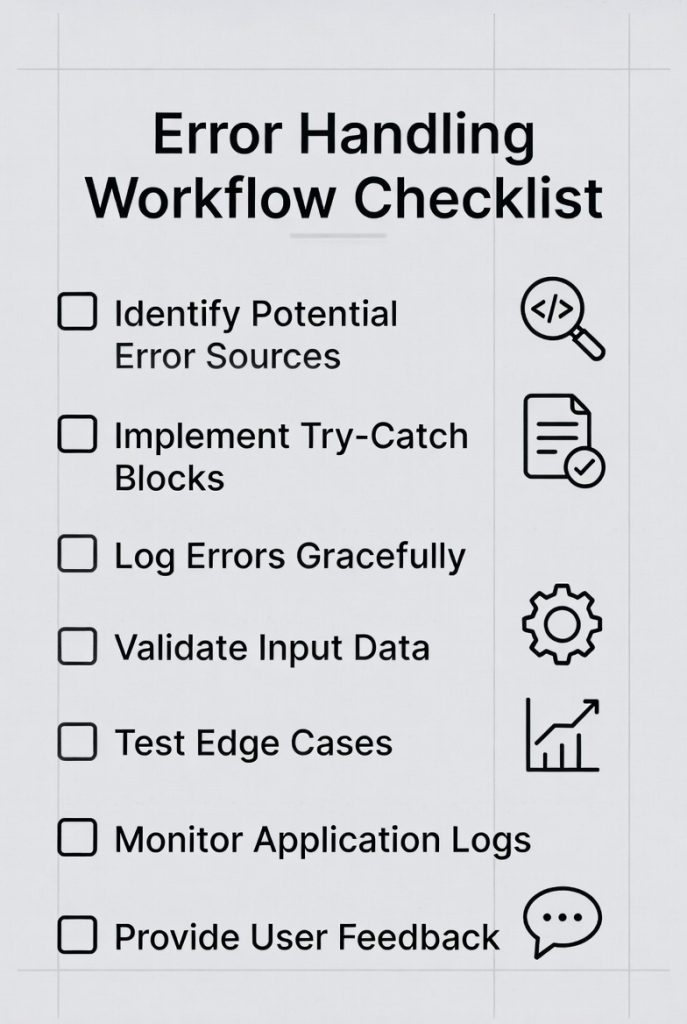
Actionable Checklist to Strengthen Error Handling Workflows
- Define error categories and severity levels
- Implement centralized, structured logging
- Set meaningful monitoring thresholds
- Design user-friendly error messages
- Automate testing and deployment checks
- Create incident response playbooks
- Conduct regular post-incident reviews
By following this checklist, teams can catch bugs faster, reduce production failures and build systems that users – and stakeholders – can rely on.
Conclusion
A strong error handling workflow is no longer just a safety net; it is a speed multiplier. When teams consistently log meaningful context, automate alerts and validate failures early, bugs surface before customers ever notice. As you apply this checklist, start small, refine continuously and review failures in calm postmortems, not crisis meetings. Over time, you will notice fewer late-night alerts and more confident releases.
More Articles
Data Analysis Automations vs Manual Processes Which is More Efficient
How to Boost ROI with AIO Tools for Smarter Business Decisions
How to Create API Documentation That is Clear and User-Friendly
10 Ways AI is Revolutionizing Data Analytics for Better Decision-Making
Essential Checklist to Optimize Your WordPress Website for Better Performance

FAQs
What is an error handling workflow checklist. why does it matter?
An error handling workflow checklist is a step-by-step guide teams use to detect, log, handle and resolve errors consistently. It matters because it reduces missed edge cases, speeds up debugging and lowers the risk of bugs reaching production.
At what stage of development should error handling be reviewed?
Error handling should be reviewed at multiple stages: during design, while coding, in code reviews and again before release. Catching issues early is cheaper and final checks help ensure nothing slips through.
What types of errors should be included in the checklist?
The checklist should cover validation errors, system and runtime errors, third-party failures, network issues and unexpected edge cases. Both user-facing and internal errors need clear handling rules.
How can a checklist help reduce production failures?
A checklist enforces consistency. It ensures errors are logged correctly, handled gracefully and tested properly, which reduces unhandled exceptions and silent failures in production.
Should error messages be treated differently for users and developers?
Yes. User-facing messages should be clear and actionable without exposing technical details, while developer-facing logs should include stack traces, context and identifiers to speed up debugging.
How often should the error handling checklist be updated?
It should be updated whenever new features, technologies, or failure patterns are introduced. Regular reviews after incidents or postmortems also help keep it relevant.
What’s a common mistake teams make with error handling workflows?
A common mistake is focusing only on catching errors, not on what happens next. Without proper logging, alerts and follow-up processes, errors may be caught but still go unnoticed.